
Click here to see the article.
Codonics Printer FAQs
V1.4 05/08/2025
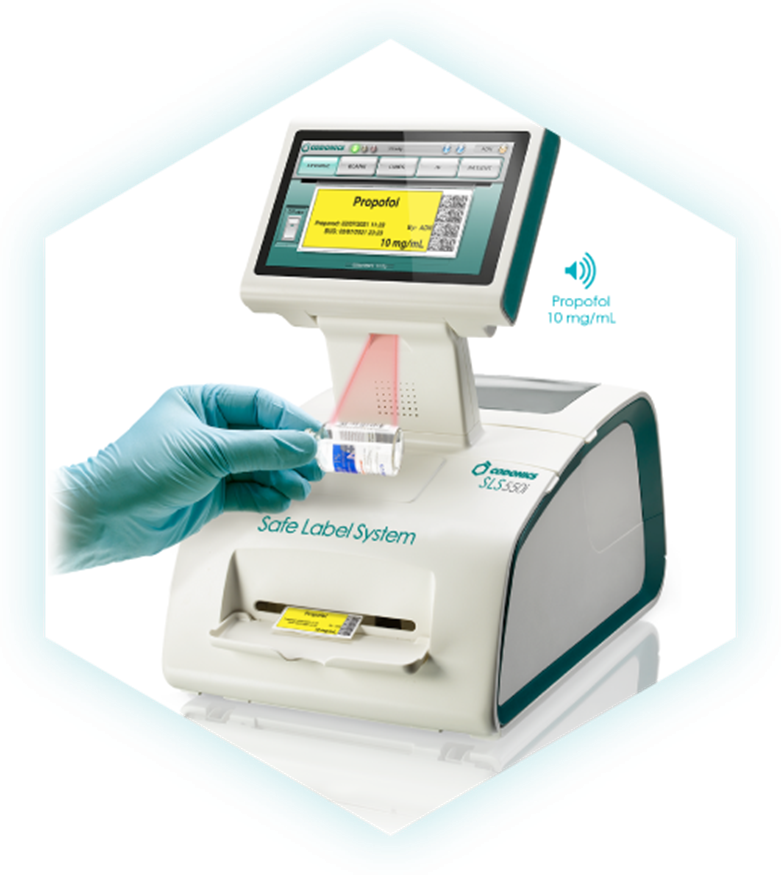
Q1: What is a “Codonics Printer”?
A1: “Codonics Safe Label System (SLS) is an award-winning, FDA-approved medical device that improves the safety and accuracy of medication management, integrating worldwide recognized best practices and international standards. A complete solution to enhance patient care, SLS uses barcode technology to read information from a drug container and electronically verify it against the hospital’s pharmacy-approved formulary database at the point of care.” (www.codonics.com)
Q2: Why is a Codonics Printer an important add-on to the Mira Care station?
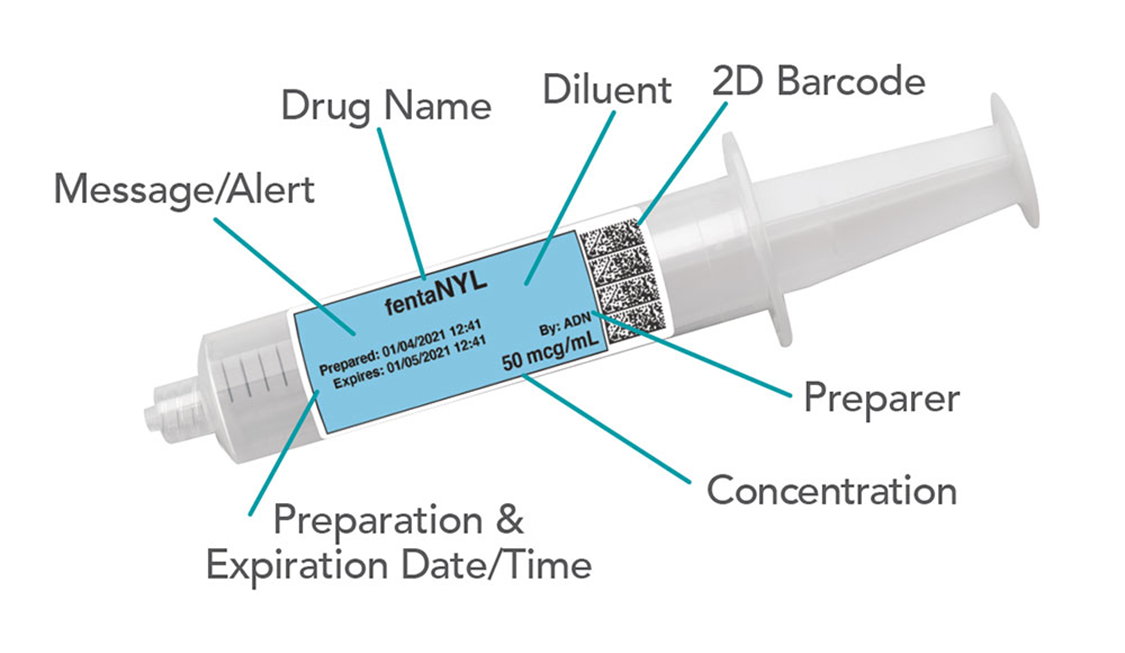
A2: With the Codonics Printer, “… every syringe gets an easy-to-read, TJC-compliant full-color label on demand that reduces medication errors and increases safety in the OR—delivering confidence and speed when precision matters most.” (www.codonics.com)
Q3: What are some key tasks for IG Sales & Finance?
A3: First, Sales must set the client’s expectations regarding purpose, benefits and costs they will incur. Second, the following product codes must be on all client quotes & purchase orders:
- (SLS 600i) Codonics Safe Label System – this is the printer itself
- (SLS500-wifi) Wifi Option Bundle – one for each printer to direct connect printer & MiraCare Station
- (SLS500KY-BMP) Batch mode printing feature key – one for each printer
- (SLS-Install) Installation – one for each printer
- (SLS-600 IGARM) GCX Mounting arm for Codonics – one for each printer
- (SLS 500KY-EN-S): Email Notifier Key – one per site (hospital)
- (AT-ACC-Kit-2) SLS Administration tool accessory Kit – one per site (hospital)
- (SLC-500_XXX) SLS Admin Tool Software – specify code for 1 printer, 1 site, 1 region or enterprise.
Q4: What if we have an implementation pending, but one of the product codes above was not included on the quote or Purchase Order?
A4: All of the items are required, so if one or more was omitted, Intelliguard must order them anyway and absorb the cost. If omissions are discovered, discuss with key stakeholders like Product Management, Sales and Accounting to discuss options and next steps.
Q5: What are some key tasks for IG Implementation & Client Services?
A5: There are several things to consider in the project plan for implementation:
- For new clients…
- The Codonics implementation spans ~12 weeks
- Setup includes a server, database, dedicated IP address and a network port (this is in addition to the IP address and port required by the Mira Care unit).
- Shipping should be arranged early to avoid any transportation delays. The Implementation PM (USA) or Client Services Manager (Canada) must provide the address and arrange any physical security building access for Codonics. The Codonics point of contact is Michael Grabel, Director of Technical Services at mgrabel@codonics.com or (215) 947-4555.
NOTE: the arm that attaches the printer to the anesthesia station must be provided and shipped from Intelliguard.
- For existing clients, a mandatory software upgrade might be required which is free but adds lead time. Other optional upgrades can happen post-implementation.
Q6: What are the connectivity requirements for Codonics printers?
A6: Connectivity must take both single-signon (SSO) and formulary updates into consideration.
For SSO, Codonics printers require either:
- a hardwired connection to the MiraCare Station, or
- a hardwired connection to an independent network port (different port than MiraCare).
For formulary updates, Codonics printers require either:
- a swap-in SD card that contains the new formulary, or
- a wireless connection using Codonic’s proprietary wireless adapter, or
- a hardwired connection to a network port (different port than MiraCare).
So, for both features to function properly, the two connection options are either:
- MiraCare connected to one network port andthe Codonics printer connected to a different network port, plus a static IP for the Codonics printer. This will allow both SSO and formulary updates to function ideally (preferred solution).
- A single network port for MiraCare anda hardwired USB Ethernet connection from MiraCare to the Codonics printer and one of the following:
- Codonics wireless adapter for formulary updates (not a preferred solution)
- Client commitment to change out SD cards when the formulary is updated
Q7: Are there any special clinical considerations for US clients vs Canadian clients?
A7: For US Clients, a template is required for tall man lettering, label design, preparation (dilution) information, etc. This template is then integrated into a formulary builder, followed by software training provided by Codonics. They use a drug databank to serve as the primary source of truth for this process.
For Canadian Clients, there is also a template, but the client provides Codonics with their generic drug names, parental concentrations, and barcode data due to the lack of a drug databank. Clients are typically asked for a formulary dump of their HIS database to assist with this effort. Their database is built manually, without a formulary builder.
Q8: Why don’t Intelliguard employees install the Codonics Printer?
A8: Currently, Intelliguard has not been formally trained on the installation procedure. When that training occurs, then Intelliguard will install the Codonics printer during the normal implementation process.